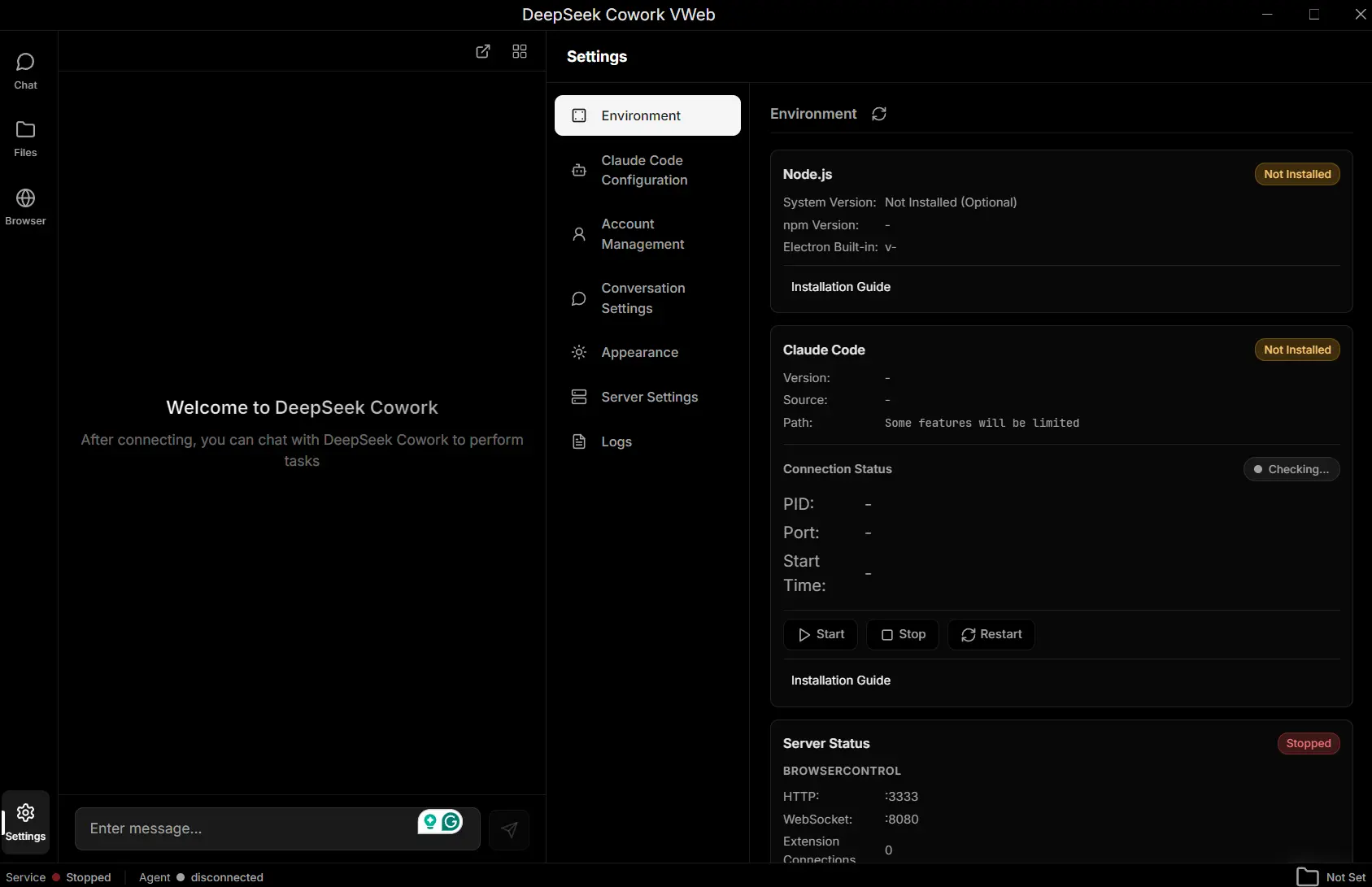
DeepSeek Cowork is a free, open-source AI assistant that handles browser automation and file management tasks. It functions as a direct, self-hosted alternative to Anthropic’s Claude Cowork.
The assistant leverages the DeepSeek LLM to provide a “Hybrid SaaS” experience. You can use it to automate repetitive browser tasks, manage your files through natural language commands, and maintain conversation context across sessions.
Features
- Browser Automation: The assistant can open web pages, fill forms in batch mode, extract data from multiple sites, and perform cross-site operations through natural language instructions.
- Local File Management: You get full file system access so the AI can browse directories, organize files by type or date, preview documents, and move content between folders based on your commands.
- Persistent Memory System: DeepSeek Cowork remembers your conversation history and preferences across sessions. The AI learns your work patterns over time and maintains context between different tasks.
- Hybrid Architecture: The system combines local processing with cloud AI. Your desktop runs a Node.js service that handles file operations and browser control while DeepSeek’s API processes AI requests.
- End-to-End Encryption: All messages get encrypted on your device before transmission. The Happy integration provides secure session management and encrypted sync across devices so you can monitor tasks from your phone.
- Multi-Platform Support: You can choose between an Electron desktop app, web interface through your browser, or CLI tool for terminal users.
- Agent Skills support: Built-in skills extend the AI’s capabilities. You can deploy pre-made skills for document creation, PDF handling, presentations, and spreadsheets or create custom skills for specialized workflows.
See It In Action
Use Cases
Data Collection and Research: You can tell the AI to extract pricing information from ten competitor websites and compile the data into a spreadsheet. The tool opens each page, scrapes the relevant data, and formats everything into a structured document.
Batch Form Processing: Registration forms across multiple sites can be filled automatically using a contact list you provide. The AI reads your CSV file, navigates to each form, and inputs the correct information for each entry.
File Organization Tasks: Your downloads folder gets sorted by file type with a single command. The AI scans all files, creates category folders, and moves documents, images, videos, and archives into their appropriate locations.
Website Monitoring: The tool checks specific pages daily for content changes. You receive notifications when updates occur so you can track competitor pricing, job postings, or product availability without manual checking.
How to Use It
Desktop Version
1. Make sure you first have Git and Node.js installed on your computer.
2. Clone the repository from GitHub and navigate into the project directory.
git clone https://github.com/imjszhang/deepseek-cowork.git
cd deepseek-cowork
3. Install DeepSeek Cowork.
# Production Mode
$ npm install

# Development Mode
$ npm run dev
Web Version
1. Install the CLI tool globally.
npm install -g deepseek-cowor2. Start the local service in background mode. The daemon flag runs the service in the background so it persists after closing your terminal.
deepseek-cowork start --daemon3. Open the web interface. This launches your default browser and connects to localhost:3333. The web interface provides the same functionality as the desktop app but runs in your browser. Your browser communicates with the local service through HTTP and WebSocket connections.
deepseek-cowork openBrowser Extension Installation
Browser automation features require the JS Eyes extension.
1. Download the extension from the JS Eyes GitHub repository.
2. Open your browser’s extension management page (chrome://extensions/ for Chrome, edge://extensions/ for Edge, about:debugging for Firefox). Enable Developer mode using the toggle switch.
3. Click Load unpacked extension and select the folder containing JS Eyes for your specific browser.
4. The extension auto-connects to DeepSeek Cowork when both are running. JS Eyes provides the bridge between the AI’s commands and your browser tabs. It can execute scripts, extract page data, and control navigation across multiple tabs.
CLI Command Reference
Service Management
deepseek-cowork start: Starts the local service in foreground mode. The service runs in your terminal and shows real-time logs. Press Ctrl+C to stop.deepseek-cowork start --daemon: Starts the service in background mode. The process persists after closing your terminal. Logs are written to a file instead of your console.deepseek-cowork stop: Stops the running background service. This only works if you started the service with the daemon flag.deepseek-cowork status: Displays the current service status. Shows whether the service is running, the process ID, and uptime information.deepseek-cowork open: Opens the web interface in your default browser. This connects to localhost:3333 where your local service runs.deepseek-cowork config: Opens the configuration file in your default editor. You can modify API keys, service ports, and other settings.
Skill Deployment
deepseek-cowork deploy: Deploys all built-in skills to your work directories. Skills are copied to .claude/skills/ folders where the AI can access them.deepseek-cowork deploy --lang zh: Deploys skills using Chinese language templates instead of English.deepseek-cowork deploy --from ./my-skill --target my-project: Deploys a custom skill from any path on your system to a specific project directory.deepseek-cowork deploy status: Shows which skills are currently deployed and where they’re located in your filesystem.
Module Management
deepseek-cowork module list: Lists all available server modules that can extend functionality.deepseek-cowork module deploy demo-module: Deploys a specific module by name to your local service.deepseek-cowork module deploy my-module --from ./my-module-source: Deploys a custom module from any directory path.deepseek-cowork module status: Checks which modules are currently deployed and running.
Pros
- Cost Efficiency: Free to use and relies on the affordable DeepSeek API or local models.
- Data Privacy: All user data and settings remain on the local machine.
- Cross-Platform: Available for Windows, macOS (Intel/Silicon), and Linux.
- No Regional Restrictions: You don’t need special access or subscriptions tied to specific countries.
Cons
- Model Performance Gap: DeepSeek models don’t match GPT or Claude Opus in reasoning capability.
- Setup Complexity: Installation requires terminal commands and Node.js knowledge.
Related Resources
- Happy GitHub Repository: Read the source code and documentation for the encrypted session management client that powers mobile access.
- JS Eyes Browser Extension: Get the browser automation extension that enables tab control and script execution across web pages.
- DeepSeek API Documentation: Access the official API docs to understand rate limits, pricing, and model capabilities.
- Electron Documentation: Learn about the desktop framework if you want to customize the app or contribute to development.
- Claude Cowork Official Page: Compare features with the proprietary alternative that inspired this project.
- Claude Cowork Alternatives: Discover more free and open-source alternatives to Claude Cowork.
FAQs
Q: How does DeepSeek Cowork compare to Claude Cowork in terms of functionality?
A: DeepSeek Cowork provides similar browser automation and file management capabilities but uses DeepSeek’s models instead of Claude. The core difference lies in the AI’s reasoning ability (Claude is stronger) versus cost and accessibility (DeepSeek is much cheaper and has no regional restrictions). Claude Cowork requires a Claude subscription and might not be available in your region. DeepSeek Cowork runs on your local machine with just an API key. The skill system and basic automation features work similarly across both tools.
Q: Is my data safe when using DeepSeek Cowork?
A: Your files and browsing data never leave your computer. The local Node.js service handles all file operations and browser automation locally. Only your text prompts and the AI’s responses travel to DeepSeek’s servers through encrypted API calls.
Q: Can I use DeepSeek Cowork without an internet connection?
A: The file management features work offline since they run on your local machine. Browser automation also works for local HTML files. The AI assistance requires internet connectivity because it calls DeepSeek’s API for processing natural language instructions.
Q: What happens if the local service crashes during a task?
A: The current version doesn’t include automatic recovery mechanisms. If the service stops, your in-progress task will fail and you’ll need to restart it manually. The web interface will show a connection error when it can’t reach the local service. You can restart the service with deepseek-cowork start and begin your task again.
Q: Can I use this on my phone?
A: You can use the Happy App (available on iOS and Android) to connect to your local instance. This allows you to monitor tasks and control the AI remotely.