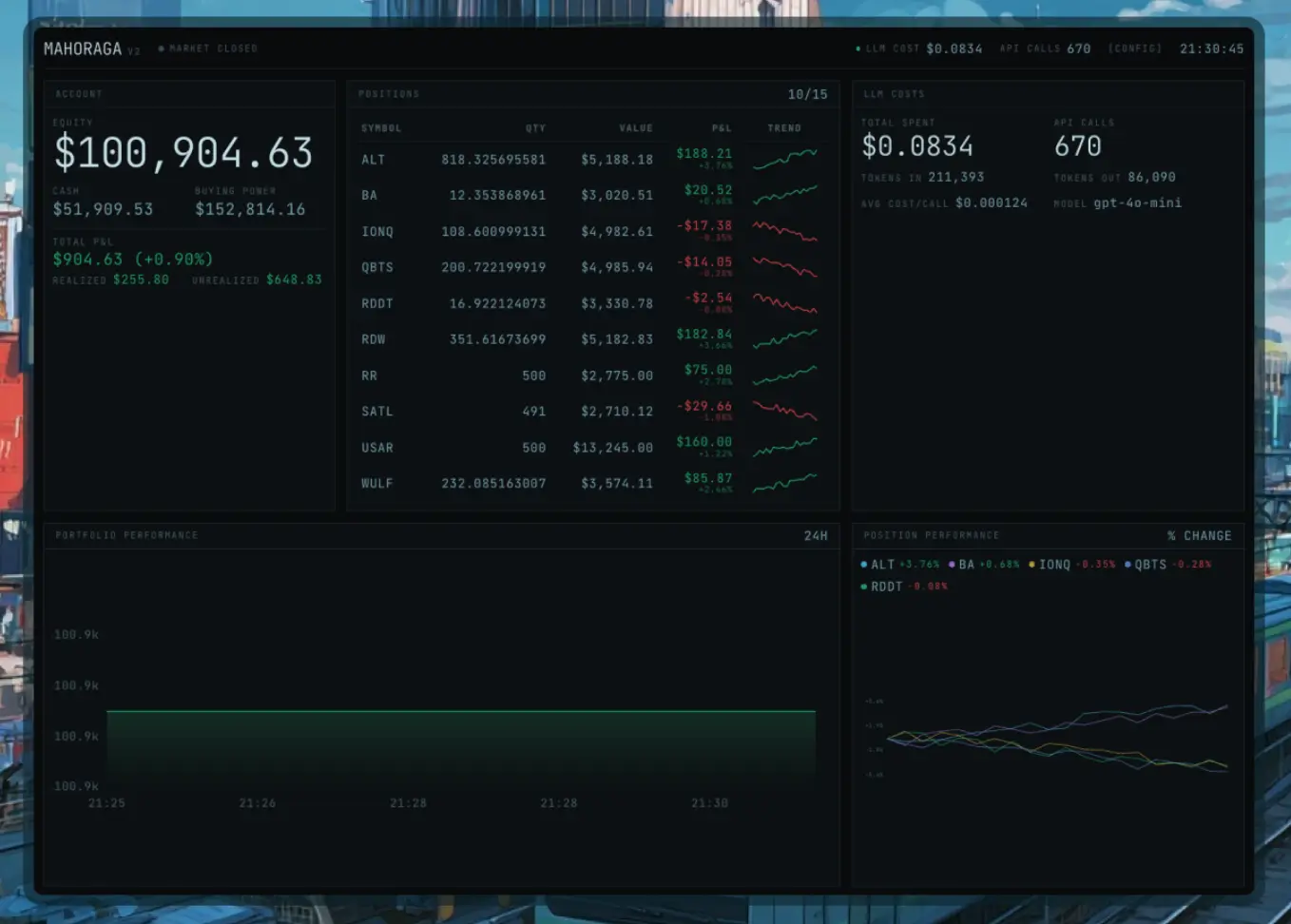
MAHORAGA is a free, open-source AI trading agent that monitors social media sentiment and executes trades automatically through the Alpaca platform. It runs continuously on Cloudflare Workers without requiring a local machine.
This agent scrapes StockTwits and Reddit for trending stock tickers, feeds the data to large language models (OpenAI, Anthropic, Google, xAI, or DeepSeek) for analysis, and executes trades based on confidence scores. It supports both traditional equities during market hours and 24/7 cryptocurrency trading for BTC, ETH, and SOL.
Features
- 24/7 Cloud Operation: Runs on Cloudflare Workers as a Durable Object.
- Multi-Source Social Sentiment: Monitors StockTwits and four Reddit subreddits for trending tickers.
- LLM-Powered Analysis: Each trading signal goes through AI research. The LLM examines sentiment patterns, timing, potential catalysts, and red flags before generating a confidence score between 0 and 1.
- Multiple AI Provider Support: Supports three modes: direct OpenAI API calls, Vercel AI SDK for multi-provider access, or Cloudflare AI Gateway for unified billing.
- Cryptocurrency Trading: Trades Bitcoin, Ethereum, and Solana around the clock.
- Options Trading: High-conviction signals can trigger options plays (disabled by default). This feature requires manual activation in the configuration.
- Staleness Detection: Monitors position momentum. Trades that lose social buzz get automatically exited before they turn into larger losses.
- Pre-Market Analysis: Analyzes overnight signals and prepares trading plans before the market opens at 9:30 AM EST.
- Discord Notifications: BUY signals can trigger webhook notifications to your Discord server.
- Paper Trading Mode: Alpaca paper trading runs by default. You can test strategies without risking real money.
- Built-in Safety Controls: The system includes stop losses, position limits, daily loss limits, and an emergency kill switch. All positions are long-only with no margin trading.
Use Cases
- Retail Traders Testing Sentiment Strategies: Individual traders can deploy this agent to test whether social media sentiment predicts short-term price movements.
- Build Custom Trading Logic: You can add new data sources (like news APIs or earnings calendars) by following the existing signal gathering pattern.
- Crypto Day Traders: The 24/7 crypto support means the agent monitors and trades BTC, ETH, and SOL during weekends and holidays when traditional markets are closed.
- Risk-Averse Investors Learning Automation: The combination of paper trading, stop losses, and daily loss limits creates multiple safety nets.
How to Use It
Table Of Contents
Installation and Setup
Clone the repository and install dependencies:
git clone https://github.com/ygwyg/MAHORAGA.git
cd mahoraga
npm install
Create Cloudflare Resources
Set up the D1 database for persistent storage:
npx wrangler d1 create mahoraga-dbCopy the returned database_id into your wrangler.jsonc file under the [[d1_databases]] binding.
Create the KV namespace for caching:
npx wrangler kv namespace create CACHECopy the returned id into wrangler.jsonc under the [[kv_namespaces]] binding.
Run database migrations:
npx wrangler d1 migrations apply mahoraga-dbConfigure API Keys and Secrets
Generate a secure API token for authentication:
openssl rand -base64 48Store all required secrets through the Wrangler CLI. The system needs Alpaca credentials and at least one LLM provider:
npx wrangler secret put ALPACA_API_KEY
npx wrangler secret put ALPACA_API_SECRETnpx wrangler secret put MAHORAGA_API_TOKEN
npx wrangler secret put ALPACA_PAPER
Set ALPACA_PAPER to true for paper trading.
Choose an LLM provider mode and configure the appropriate keys:
npx wrangler secret put LLM_PROVIDER
npx wrangler secret put LLM_MODEL
For direct OpenAI access (the default mode), set:
LLM_PROVIDERtoopenai-rawLLM_MODELtogpt-5-mini(recommended for cost efficiency)
npx wrangler secret put OPENAI_API_KEYFor Vercel AI SDK multi-provider support, set:
LLM_PROVIDERtoai-sdkLLM_MODELto a provider-prefixed model likeanthropic/claude-sonnet-4
npx wrangler secret put ANTHROPIC_API_KEYThe AI SDK supports these providers:
- OpenAI
- Anthropic
- xAI
- DeepSeek
For Cloudflare AI Gateway unified billing, set:
LLM_PROVIDERtocloudflare-gatewayLLM_MODELto a gateway format likeopenai/gpt-5-mini
npx wrangler secret put CLOUDFLARE_AI_GATEWAY_ACCOUNT_ID
npx wrangler secret put CLOUDFLARE_AI_GATEWAY_ID
npx wrangler secret put CLOUDFLARE_AI_GATEWAY_TOKEN
Optional secrets enhance functionality:
npx wrangler secret put TWITTER_BEARER_TOKEN
npx wrangler secret put DISCORD_WEBHOOK_URL
npx wrangler secret put KILL_SWITCH_SECRET
The KILL_SWITCH_SECRET should differ from your main API token. This means you can share monitoring access without granting kill-switch control.
Deploy to Cloudflare
Push the agent to production:
npx wrangler deployWrangler returns a URL like https://mahoraga.your-subdomain.workers.dev. Save this URL for API calls.
Start the Trading Agent
Export your API token to an environment variable:
export MAHORAGA_TOKEN="your-api-token-here"Enable the agent through the API:
curl -H "Authorization: Bearer $MAHORAGA_TOKEN" \
  https://mahoraga.your-subdomain.workers.dev/agent/enable
The agent begins monitoring StockTwits and Reddit immediately. Check status:
curl -H "Authorization: Bearer $MAHORAGA_TOKEN" \
  https://mahoraga.your-subdomain.workers.dev/agent/status
View recent activity logs:
curl -H "Authorization: Bearer $MAHORAGA_TOKEN" \
  https://mahoraga.your-subdomain.workers.dev/agent/logs
Local Development Workflow
Test changes locally before deploying. Open three terminal windows:
Terminal 1 starts the Cloudflare Workers development server:
npx wrangler devTerminal 2 runs the React dashboard:
cd dashboard
npm install
npm run dev
Terminal 3 enables the agent on localhost:
curl -H "Authorization: Bearer $MAHORAGA_TOKEN" \
  http://localhost:8787/agent/enable
The dashboard runs at http://localhost:5173 by default. You can monitor positions, signals, and account status in real-time.
Configuration Options Reference
The agent exposes these tunable parameters through the /agent/config endpoint:
| Parameter | Default | Description |
|---|---|---|
max_positions | 5 | Maximum number of concurrent open positions |
max_position_value | 5000 | Maximum dollar amount per position |
take_profit_pct | 10 | Exit position at this profit percentage |
stop_loss_pct | 5 | Exit position at this loss percentage |
min_sentiment_score | 0.3 | Ignore signals below this sentiment threshold |
min_analyst_confidence | 0.6 | LLM must reach this confidence to execute |
options_enabled | false | Enable options trading for high-conviction plays |
crypto_enabled | false | Enable 24/7 BTC, ETH, SOL trading |
llm_model | gpt-4o-mini | Model for bulk research tasks |
llm_analyst_model | gpt-4o | Model for final trading decisions |
Update configuration through the API:
curl -X POST \
  -H "Authorization: Bearer $MAHORAGA_TOKEN" \
  -H "Content-Type: application/json" \
  -d '{"max_positions": 3, "take_profit_pct": 15}' \
  https://mahoraga.your-subdomain.workers.dev/agent/config
API Endpoints Reference
All endpoints require Bearer token authentication through the Authorization header.
| Endpoint | Method | Description |
|---|---|---|
/agent/status | GET | Returns account balance, open positions, recent signals, and agent state |
/agent/enable | POST | Activates the trading loop and scheduled checks |
/agent/disable | POST | Stops all trading activity and cancels alarms |
/agent/config | GET | Retrieves current configuration parameters |
/agent/config | POST | Updates configuration (pass JSON body with parameters) |
/agent/logs | GET | Returns recent activity logs and errors |
/agent/trigger | POST | Manually runs the trading loop (for testing) |
/agent/kill | POST | Emergency shutdown (requires KILL_SWITCH_SECRET) |
/mcp | POST | MCP server endpoint for external tool integrations |
Customization Markers
The main trading logic lives in src/durable-objects/mahoraga-harness.ts. The file uses three marker types:
[TUNE] markers indicate numeric values you can adjust:
- Sentiment thresholds
- Position sizing calculations
- Timeout intervals
- Confidence score cutoffs
[CUSTOMIZABLE] markers flag sections where you might want to modify the logic:
- Signal scoring algorithms
- Risk assessment rules
- Position exit conditions
- Data source weights
[TOGGLE] markers show features you can enable or disable:
- Individual data sources
- Options trading
- Crypto support
- Specific validation checks
Adding New Data Sources
The agent’s modular design makes adding sources straightforward. Create a new method that returns a Signal[] array:
async gatherNewsAPI(): Promise<Signal[]> {
  const signals: Signal[] = [];
  // Fetch and process news data
  return signals;
}
Add your method to the runDataGatherers() Promise.all array. Update SOURCE_CONFIG.weights to assign a weight to your new source.
The detailed customization guide at docs/harness.html covers adding technical indicators, fundamental data sources, and custom scoring functions.
Pros
- Low Running Cost: It runs on the Cloudflare free tier. LLM costs are minimal when using small models.
- High Availability: Cloudflare Workers guarantee the agent stays online 24/7.
- Model Flexibility: You can switch between OpenAI, Claude, and DeepSeek by changing one environment variable.
- Risk Management: The daily loss limit stops trading after a 2% drawdown.
Cons
- Technical Setup: You must be comfortable with the command line and Cloudflare Wrangler.
- Long Only: The current version does not support shorting stocks.
- Cash Only: The system does not support margin trading.
Related Resources
- Alpaca Markets API Documentation: Commission-free stock and crypto trading API. MAHORAGA uses this for order execution.
- Cloudflare Workers Documentation: Learn about the serverless platform that runs the agent 24/7.
- Vercel AI SDK: Multi-provider LLM framework. Useful if you want to understand the AI SDK integration mode.
- StockTwits API: Social sentiment data source. Check rate limits and terms of service.
- MAHORAGA GitHub Repository: Official source code, issue tracker, and community discussions.
- MAHORAGA Discord Server: Community support channel for troubleshooting and strategy discussions.
FAQs
Q: Can I use this with my existing brokerage account?
A: MAHORAGA only integrates with Alpaca Markets. The agent uses Alpaca’s API for order execution, position monitoring, and account balance checks. You need to create an Alpaca account (free) and fund it if you want to trade with real money. The paper trading mode doesn’t require funding.
Q: Does the agent trade pre-market and after-hours?
A: The agent monitors signals continuously but only executes equity trades during regular market hours (9:30 AM – 4:00 PM EST). Cryptocurrency trades execute 24/7. You can modify the code to enable extended hours trading through Alpaca, but this requires changing the market hours validation in the harness.
Q: What happens if Cloudflare Workers goes down?
A: Durable Objects maintain state across restarts. If Cloudflare experiences an outage, your positions remain open in your Alpaca account. The agent resumes monitoring when service restores. Stop losses configured in Alpaca (separate from the agent’s logic) continue to protect positions during outages.
Q: Can I backtest strategies before going live?
A: The system doesn’t include built-in backtesting. You can enable the agent in paper trading mode to collect forward-looking performance data. For historical backtesting, you’d need to export past StockTwits and Reddit data, run them through the LLM, and simulate trades yourself.
Q: How do I know if a signal is good before the agent trades it?
A: The agent logs all LLM analysis to the database before executing. You can query the /agent/logs endpoint to see the reasoning chain, confidence score, and risk factors. The Discord webhook sends notifications when BUY signals reach the execution threshold. You can review these alerts and manually disable the agent if you disagree with a trade.
Q: Is this legal to run?
A: Automated trading through APIs like Alpaca is legal in the United States for personal accounts. Check your local regulations.
Q: What’s the minimum account size to run this effectively?
A: Paper trading works with any balance. For real money, start with at least $5,000. The default max_position_value is $5,000, so you can only open one position at a time with less capital. The max_positions setting of 5 assumes you can deploy $25,000 total.