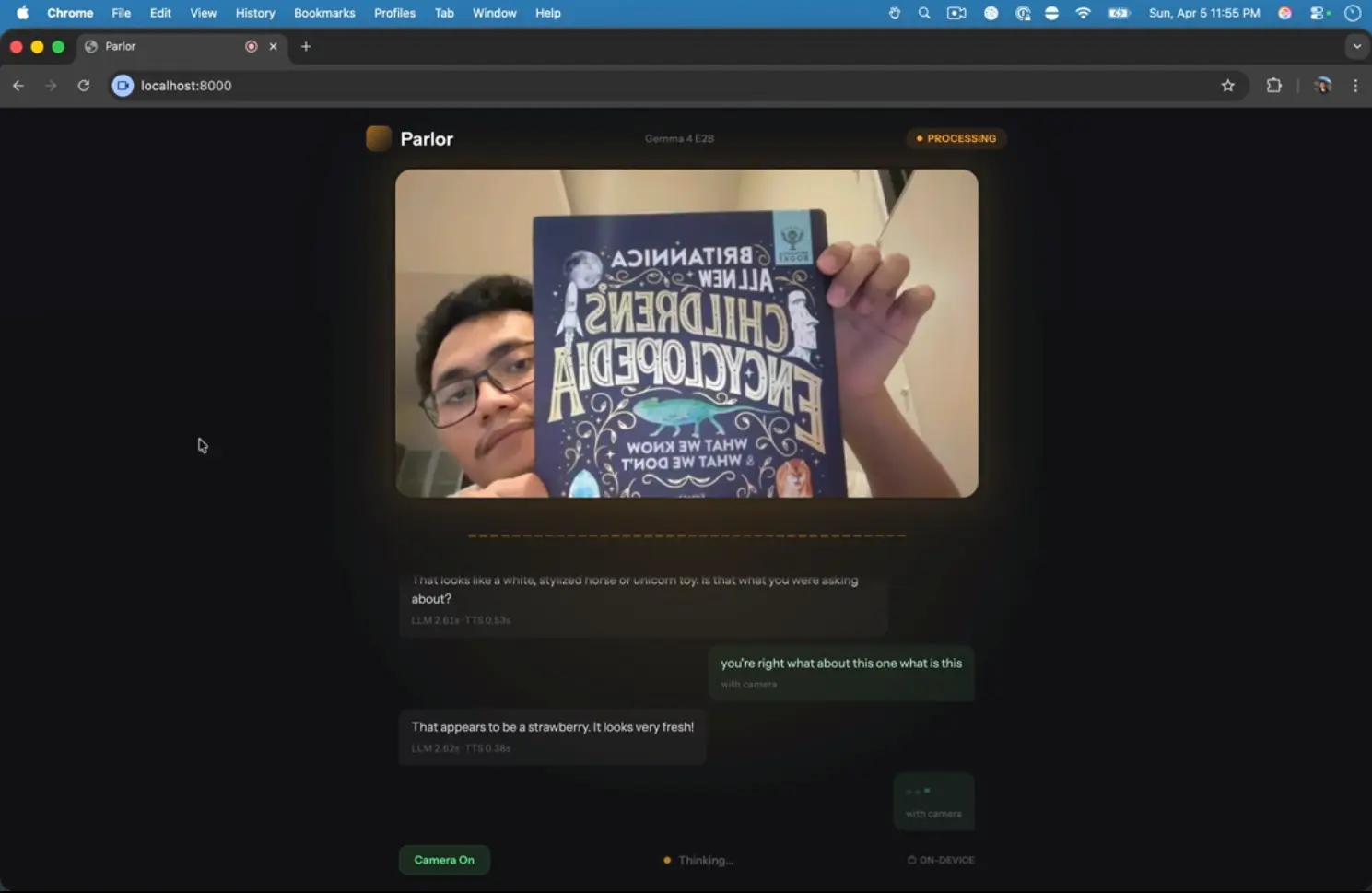
Parlor is a free, open-source AI tool that runs a multimodal AI voice assistant entirely on your device. It accepts live microphone input and camera video, processes both through on-device models, and speaks back a response in real time. No cloud API calls and no usage fees.
The tool runs Google’s latest Gemma 4 E2B model for speech and vision understanding, and the Kokoro model for text-to-speech output. This combination enables Parlor to hold a spoken conversation while simultaneously interpreting what your camera sees.
A language learner can hold up a textbook and ask for a pronunciation guide. A developer tinkering with local AI can stress-test the latency characteristics of running inference on consumer hardware. The total round-trip time on an Apple M3 Pro sits between 2.5 and 3.0 seconds.
Features
- Runs speech input, vision input, text generation, and text-to-speech locally on your machine.
- Uses Gemma 4 E2B to process spoken input and camera frames in the same conversation loop.
- Uses Kokoro to speak responses back through a local text-to-speech pipeline.
- Streams microphone audio and JPEG camera frames from the browser to a FastAPI server over WebSocket.
- Streams generated audio chunks back to the browser for playback and transcript display.
- Detects speech activity in the browser with Silero VAD.
- Supports barge-in so you can interrupt the AI during playback.
- Starts playback at the sentence level before the full response finishes.
- Supports macOS on Apple Silicon, and Linux on systems with a compatible GPU.
See It In Action
Use Cases
- Practice speaking a new language with an AI that understands both your voice and what you point your camera at.
- Describe objects, scenes, or documents in real time and hear the AI’s spoken description or answer.
- Build or modify a privacy-first voice assistant for offline use in sensitive environments.
How to Use It
1. Clone the repository from GitHub:
git clone https://github.com/fikrikarim/parlor.git
cd parlor
2. Install the uv package manager if it is not already present:
curl -LsSf https://astral.sh/uv/install.sh | sh3. Move into the src directory, sync dependencies, and start the server:
cd src
uv sync
uv run server.py
4. Open http://localhost:8000 in a browser, grant microphone and camera access when prompted, and begin speaking.
5. Parlor downloads Gemma 4 E2B and the text-to-speech models on the first run. The Gemma model download is about 2.6 GB. The text-to-speech models add more download size, so the first launch takes longer than later sessions.
Pros
- Zero recurring costs and complete data privacy.
- Hands-free operation with automatic voice detection.
- Multimodal input combines what you say with what the camera sees.
- Fast local inference on Apple Silicon and compatible Linux GPUs.
- Open-source codebase allows inspection, modification, and self-hosting.
Cons
- Research preview status.
- No Windows support.
- Model capability is narrower than large frontier models like GPT and Claude.
Related Resources
- Gemma 4 E2B: The multimodal model Parlor uses for speech and vision understanding.
- Kokoro TTS: The 82M-parameter text-to-speech model that generates Parlor’s audio responses.
- LiteRT-LM: The runtime Parlor uses to run Gemma 4 on-device via GPU acceleration.
- Silero VAD: The voice activity detection model that powers Parlor’s hands-free listening in the browser.
FAQs
Q: Does Parlor send any audio or video data to external servers?
A: No. All processing happens locally.
Q: What hardware does Parlor require?
A: Parlor runs on macOS with Apple Silicon (M1, M2, M3, or later) or on Linux with a supported GPU. The system needs approximately 3 GB of free RAM to load the Gemma 4 E2B model.
Q: Can I use a model I have already downloaded?
A: Yes. Set the MODEL_PATH environment variable to the local path of a gemma-4-E2B-it.litertlm file and Parlor will skip the automatic download.
Q: What is the response latency?
A: On an Apple M3 Pro, the total round-trip from speaking to hearing a response is approximately 2.5 to 3.0 seconds. Speech and vision processing takes 1.8 to 2.2 seconds, response generation adds around 0.3 seconds, and text-to-speech adds another 0.3 to 0.7 seconds.
Q: Can Parlor do coding agent work?
A: No. Parlor focuses on real time voice and vision conversation. It does not present itself as an agentic coding system or a broad task automation platform.