Open Deep Research: Free Alternative to Gemini Deep Research
Use AI for in-depth web research with Open Deep Research, the free alternative to Gemini Deep Research.

Open Deep Research is an open-source alternative to Google’s Deep Research feature in Gemini Advanced.
It transforms how you conduct online research by combining web search, content extraction, and AI-powered report generation into one web app. Ideal for researchers, analysts, students, and professionals who need comprehensive research reports but lack time to manually search and synthesize information from multiple sources.
Instead of spending hours sifting through search results and organizing findings, Open Deep Research automates the research workflow. The tool searches the web using Bing Search API, extracts relevant content with JinaAI technology, and generates detailed reports using AI – all based on your custom requirements.
Real-world Example
I explored the capabilities of Open Deep Research to understand the new “o3 model” from OpenAI. My goal was to quickly grasp its key features and technical advancements.
I started by navigating to Open Deep Research’s online demo and entering “OpenAI o3 model” as my search term. I opted for the “any time” filter to ensure a broad overview, though the option to select specific time ranges is available for more focused inquiries. After clicking “Search,” the application, powered by the Bing Search API, presented a comprehensive search result:
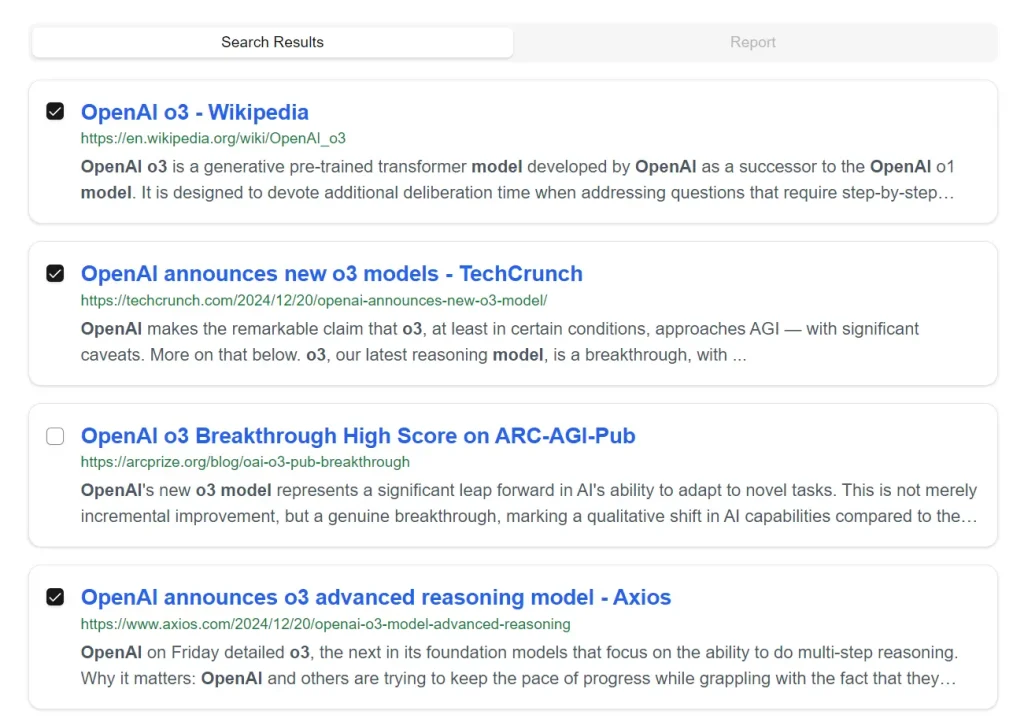
Recognizing that search results alone wouldn’t provide the depth I needed, I selected three reputable sources from the list: Wikipedia, TechCrunch, and Axios. Next, in the prompt box, I entered “Summarize key findings.”

Upon clicking “Generate Report,” Open Deep Research began extracting content from my chosen sources. The resulting report provided a concise summary of the o3 model, highlighting its improvements over its predecessor, o1, its reasoning capabilities, and benchmark performance across various tasks like coding and mathematics.
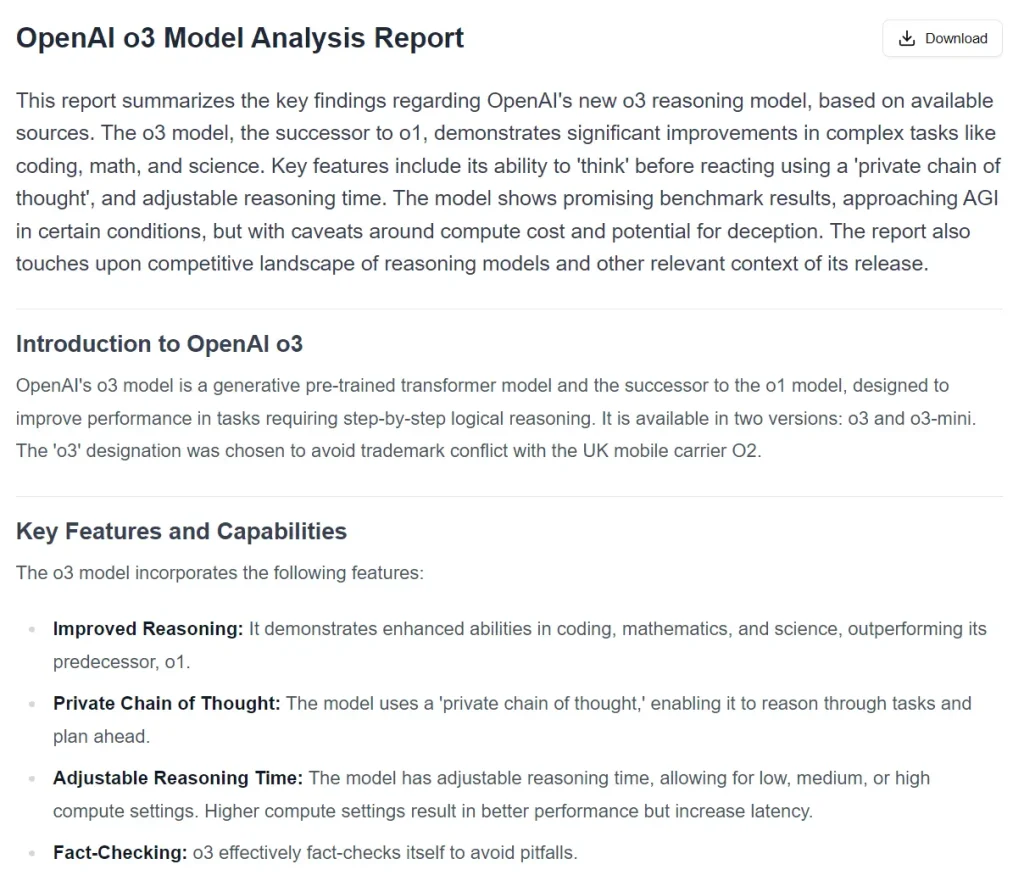
The report effectively addressed my need to quickly understand the core aspects and technical breakthroughs of the o3 model, demonstrating how this tool streamlines the initial stages of in-depth research.
Key Features
- Web Search with Time Filtering: Search across specified time periods to find the most relevant and up-to-date information.
- Content Extraction: Pull content directly from selected web pages using JinaAI technology for accurate information gathering.
- AI Report Generation: Create detailed reports from curated search results using advanced AI processing.
- Multiple Export Options: Save reports in PDF, Word, or text formats for easy sharing and reference.
- Rate Limiting Controls: Built-in rate limiting ensures stable performance and prevents overload.
- Responsive Design: Access the tool across different devices with a mobile-friendly interface.
- Customizable Settings: Modify the AI model, prompts, rate limits, and number of results to match specific needs.
Use Cases
- Academic Research: Students and researchers can quickly generate literature reviews and research summaries from academic sources.
- Market Analysis: Business professionals can gather competitive intelligence and market trends from recent web content.
- Technology Monitoring: Tech professionals can track and summarize developments in specific technical fields.
- News Synthesis: Journalists and analysts can compile comprehensive news summaries on specific topics.
Setup Instructions
- Clone the Repository from Github:
   git clone https://github.com/btahir/open-deep-research
cd open-deep-research- Install Dependencies:
   npm install
   # or
   yarn install
   # or
   pnpm install
   # or
bun install- Create a
.env.localFile:
   AZURE_SUB_KEY=your_azure_subscription_key
   GEMINI_API_KEY=your_gemini_api_key
   UPSTASH_REDIS_REST_URL=your_upstash_redis_url
UPSTASH_REDIS_REST_TOKEN=your_upstash_redis_token- Start the Development Server:
   npm run dev
   # or
   yarn dev
   # or
   pnpm dev
   # or
bun dev- Open the App: Open http://localhost:3000 in your browser.
Related Resources
- Open Deep Research GitHub Repo: https://github.com/btahir/open-deep-research
- Open Deep Research MCP Server: https://www.scriptbyai.com/open-deep-research-mcp/
- Google Gemini: https://deepmind.google/technologies/gemini/
- JinaAI: https://jina.ai/
- Azure Bing Search: https://www.microsoft.com/en-us/bing/apis/bing-web-search-api
- Upstash Redis: https://upstash.com/
FAQs
Q: How does Open Deep Research differ from a traditional search engine like Google or Bing?
A: Traditional search engines provide a list of links based on keywords. Open Deep Research goes further by extracting content from selected sources and using AI to synthesize that information into a structured report based on your specific prompts.
Q: What is Gemini Deep Research, and how does Open Deep Research compare?
A: Gemini Deep Research is a feature within Google’s Gemini Advanced that uses AI to conduct in-depth research and generate reports. Open Deep Research offers similar functionality as a free, open-source alternative, allowing for customization and local deployment.
Q: Is Open Deep Research really free to use?
A: Yes, Open Deep Research is an open-source project and free to use. However, you may need to obtain API keys for services like Bing Search and potentially Google Gemini, depending on your configuration.
Q: Can I customize the AI model used by Open Deep Research?
A: Yes, Open Deep Research allows for customization, including the ability to change the AI model used for report generation, provided you configure it correctly.
Q: What technologies power Open Deep Research?
A: Open Deep Research utilizes a combination of technologies, including Next.js, TypeScript, Tailwind CSS, Google Gemini (optionally), JinaAI, and the Azure Bing Search API.