GhidrAssistMCP
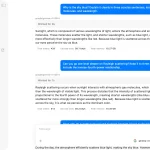
GhidrAssistMCP is an MCP server that connects AI assistants and automation tools with Ghidra’s reverse engineering platform.
It acts as a sophisticated intermediary that understands both Ghidra’s internal data structures and the context-aware needs of modern AI analysis workflows.
Features
- 31 Specialized Analysis Tools – Complete toolkit covering functions, data structures, cross-references, and program modification.
- Configurable Tool Management – Enable/disable individual tools with persistent settings across sessions.
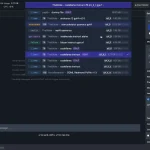
- Real-Time Activity Monitoring – Logging of all MCP requests and responses with detailed tracking.
- Context-Aware Operations – Tools that understand Ghidra’s current cursor position and active function context.
- Dynamic HTTP/SSE Transport – Efficient bidirectional communication using Server-Sent Events
- Transaction-Safe Database Operations – Robust modification tools with rollback support for safe program analysis.
- Advanced Structure Analysis – Automatic structure creation from variable usage patterns and memory layouts.
Use Cases
- AI-Assisted Malware Analysis: Connect AI assistants to automatically analyze suspicious functions, identify encryption routines, and trace data flow patterns across complex malware samples.
- Vulnerability Research Automation: Programmatically scan for buffer overflows, format string vulnerabilities, and dangerous function calls while generating detailed reports of findings.
- Legacy Code Documentation: Generate comprehensive documentation for undocumented binaries by combining AI analysis with Ghidra’s decompilation capabilities.
- Batch Binary Processing: Automate analysis of multiple firmware images or executable files with consistent methodology and reporting standards.
How to Use It
1. Download the latest release ZIP file from the project’s GitHub releases page. In Ghidra, navigate to File → Install Extensions → Add Extension and select the downloaded ZIP file. After installation completes, restart Ghidra to activate the extension.
2. Open File → Configure → Configure Plugins, search for “GhidrAssistMCP”, and enable the plugin by checking its box.
3. Access the control panel through Window → GhidrAssistMCP or click the toolbar icon. Configure the server settings with your preferred host (default: localhost) and port (default: 8080). Click the enable toggle to start the MCP server.
4. The Configuration tab displays all 31 available tools with individual enable/disable checkboxes. Save your configuration to persist settings across sessions. The system automatically registers enabled tools with the MCP server upon startup.
5. Available Analysis Tools
Program Analysis Tools:
get_program_info– Extract basic program metadata and architecture informationlist_functions– Enumerate all functions with addresses and signatureslist_data– Extract data definitions and global variableslist_strings– Locate string literals and referenceslist_imports/exports– Analyze external dependencies and exposed functionslist_segments– Map memory layout and section information
Function Analysis Tools:
decompile_function– Generate C-like pseudocode from assemblydisassemble_function– Retrieve raw assembly with addressesget_function_info– Extract detailed function metadata and call graphsfunction_xrefs– Trace function references and call patternssearch_functions– Pattern matching across function names
Modification Tools:
rename_function– Update function names with validationset_function_prototype– Define function signatures and parameter typesset_local_variable_type– Assign data types to local variablesset_disassembly_comment– Add annotations to assembly codeauto_create_struct– Generate structures from variable usage patterns
Navigation Tools:
get_current_address– Retrieve cursor position in hex formatxrefs_to/from– Analyze cross-reference relationshipsget_current_function– Context-aware function identification
6. Connect your MCP client to http://localhost:8080/sse for Server-Sent Events communication. Send JSON-RPC requests to the /message endpoint with proper tool names and parameters. The server maintains stateful sessions and handles proper lifecycle management.
{
  "method": "tools/call",
  "params": {
    "name": "decompile_function",
    "arguments": {
      "function_name": "decrypt_payload"
    }
  }
}
FAQs
Q: How do I troubleshoot connection issues?
A: Check that port 8080 is available and the server shows “Running” status in the GhidrAssistMCP window. Test connectivity with curl http://localhost:8080/sse to verify the endpoint responds.
Q: Are program modifications reversible?
A: Yes, all modification tools use Ghidra’s transaction system with rollback support. You can undo changes through Ghidra’s standard undo functionality.
Q: Can I add custom analysis tools?
A: The architecture supports custom tools through the McpTool interface. Implement the interface, register your tool in the backend, and rebuild the extension.
Latest MCP Servers
Paper Search
Codebase Memory
CVE
Featured MCP Servers
Codebase Memory
Notion
Claude Peers
FAQs
Q: What exactly is the Model Context Protocol (MCP)?
A: MCP is an open standard, like a common language, that lets AI applications (clients) and external data sources or tools (servers) talk to each other. It helps AI models get the context (data, instructions, tools) they need from outside systems to give more accurate and relevant responses. Think of it as a universal adapter for AI connections.
Q: How is MCP different from OpenAI's function calling or plugins?
A: While OpenAI's tools allow models to use specific external functions, MCP is a broader, open standard. It covers not just tool use, but also providing structured data (Resources) and instruction templates (Prompts) as context. Being an open standard means it's not tied to one company's models or platform. OpenAI has even started adopting MCP in its Agents SDK.
Q: Can I use MCP with frameworks like LangChain?
A: Yes, MCP is designed to complement frameworks like LangChain or LlamaIndex. Instead of relying solely on custom connectors within these frameworks, you can use MCP as a standardized bridge to connect to various tools and data sources. There's potential for interoperability, like converting MCP tools into LangChain tools.
Q: Why was MCP created? What problem does it solve?
A: It was created because large language models often lack real-time information and connecting them to external data/tools required custom, complex integrations for each pair. MCP solves this by providing a standard way to connect, reducing development time, complexity, and cost, and enabling better interoperability between different AI models and tools.
Q: Is MCP secure? What are the main risks?
A: Security is a major consideration. While MCP includes principles like user consent and control, risks exist. These include potential server compromises leading to token theft, indirect prompt injection attacks, excessive permissions, context data leakage, session hijacking, and vulnerabilities in server implementations. Implementing robust security measures like OAuth 2.1, TLS, strict permissions, and monitoring is crucial.
Q: Who is behind MCP?
A: MCP was initially developed and open-sourced by Anthropic. However, it's an open standard with active contributions from the community, including companies like Microsoft and VMware Tanzu who maintain official SDKs.