This is a 100% free AI Christmas Video Card generator that transforms text greetings you specify into festive video cards featuring animated characters like Santa Claus and Christmas elves.
With this tool, you can generate unique video messages for friends, family, colleagues, or clients without spending time and money on traditional cards or professional video production.
I tested the OVIDI Christmas Video Card Generator using the Christmas Caroler character. My message read: “Wishing you a Merry Christmas filled with joy, peace, and love.”
The process took under two minutes. The resulting video featured fluid character animation and clear audio delivery of my message.
Use Cases
- Personal Greetings: Send personalized Christmas greetings to friends and family.
- Business Holiday Cards: Create festive video cards for clients and colleagues.
- Social Media Content: Share animated Christmas cards on social media platforms to engage your audience.
- Educational Projects: Use OVIDI in classrooms to create fun, interactive holiday projects.
- Event Invitations: Send out invitations for holiday events with a personalized touch.
How To Use it
1. Go to the Free Christmas AI Video Card Generator.
2. Select your preferred character from the dropdown menu. Options include Santa, Christchild, Angel, Gingerbread Girl, Christmas Caroler, and Santa’s Elf.

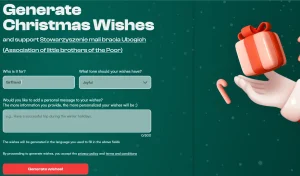
3. Click on the ‘Enter Message’ button and enter your personalized Christmas greetings. You can also select your desired language (English or German) on this page.

4. Click the ‘Generate Free Video’ button and enter your email address.

5. Click the ‘Send me the video’ button. The AI will then generate your personalized Christmas video card and automatically send it to your inbox.
6. Open your inbox and click the link provided in the email to watch your video.
7. Download the video or share it with your loved ones.
Pros
- Free to Use: No cost is involved in generating personalized video Christmas cards.
- User-Friendly Interface: The process is simple and intuitive, requiring no technical expertise.
- Quick Generation: Receive your personalized video card within 2 minutes.
- Personalization Options: Customize your greetings with a chosen character and message.
- Direct Delivery: The video card is conveniently sent directly to your inbox.
Cons
- Limited Languages: Currently only supports English and German.
- Message Length Restriction: The message is limited to 200 characters.
FAQs
Q: Can I edit the video after generation?
A: The tool does not offer editing capabilities. Generate a new video if changes are needed.
Q: Is there a limit to how many videos I can create?
A: Currently there are no restrictions on the number of free video cards you can generate.
Q: Can I share my video card on social media?
A: Yes, you can download your video card and share it on any social media platform.