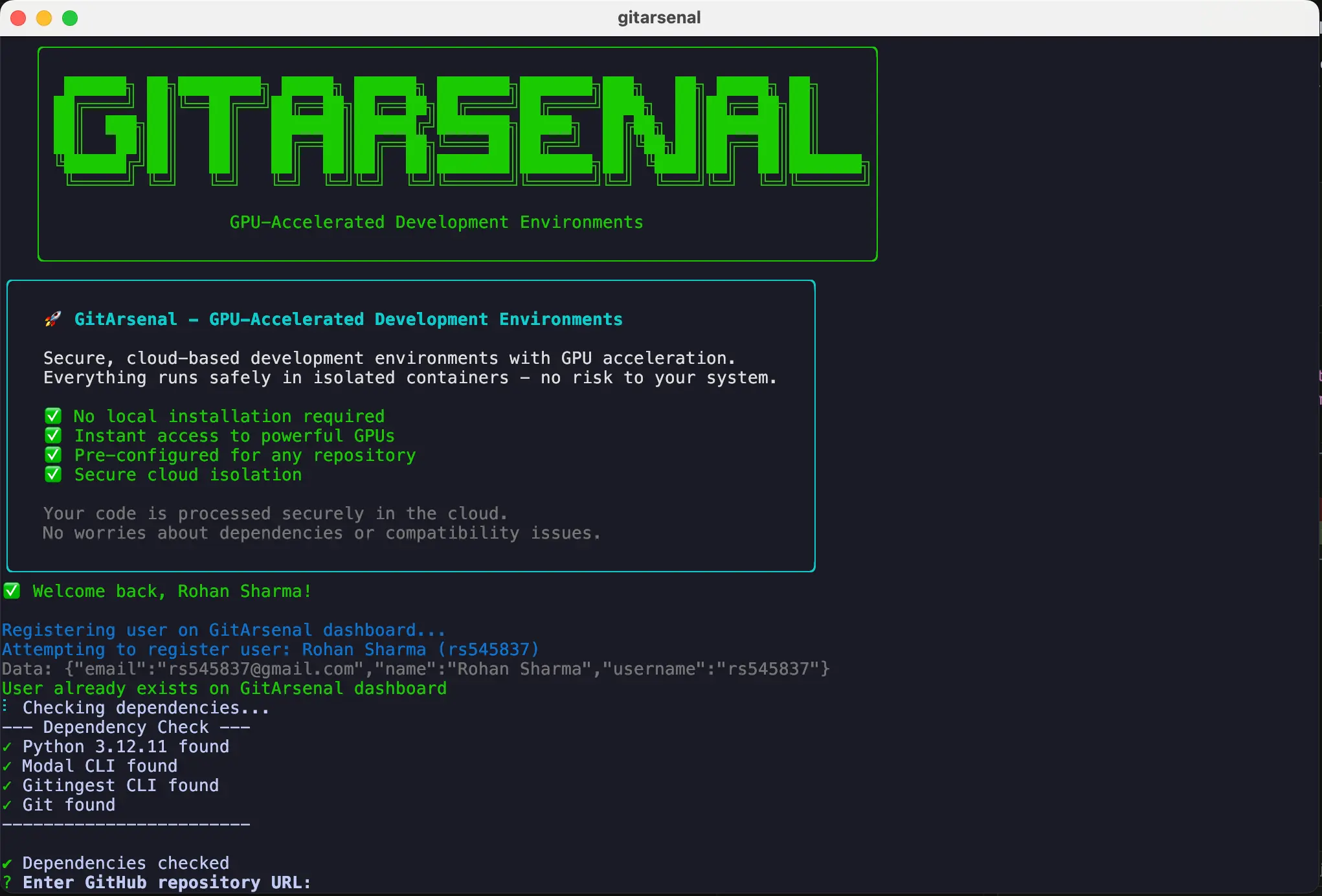
GitArsenal CLI is a free command-line AI agent that automates the setup of any GitHub repository.
It handles everything from installing dependencies and debugging errors to configuring the environment.
If you’ve ever found a cool project on GitHub only to spend the next few hours wrestling with CUDA versions, Python conflicts, and missing dependencies, you know the pain it’s designed to solve.
Instead of bookmarking repositories with the intention of exploring them later (and rarely following through), you can now go from git clone to running code in minutes rather than hours.
Features
- AI-Powered Repository Analysis: The system examines entire codebases to predict potential issues before they occur, understanding dependencies, hardware requirements, and common setup pitfalls.
- GPU-Accelerated Development Environments: Access to T4, L4, A10G, A100-40GB, A100-80GB, H100, H200, and B200 GPUs with automatic hardware selection based on project requirements.
- Persistent Storage Solutions: Modal volumes maintain work across sessions, preventing data loss when switching between different repository setups.
- Automatic API Key Management: Smart discovery and secure storage of API credentials for OpenAI, Weights & Biases, Hugging Face, and any other services detected in the codebase.
- SSH Container Access: Direct terminal access to development containers for advanced debugging and customization needs.
- Intelligent Dependency Resolution: The AI agent continues debugging setup issues until the code runs successfully.
Use Cases
- Machine Learning Research: Quickly set up complex ML research repositories that often have specific CUDA and Python version requirements. Instead of spending hours on setup, you can start experimenting with models in minutes.
- Exploring New Technologies: Try out any open-source project you find interesting without the commitment of a lengthy setup. No more bookmarking repos “to try later” and never getting to them.
- Onboarding New Developers: Help new team members get up and running on a project’s development environment almost instantly. This reduces the time it takes for them to become productive.
- Rapid Prototyping: When you have an idea and want to build upon an existing open-source project, GitArsenal gets the base code running so you can focus on building your features.
How to Use It
1. Install the GitArsenal CLI globally using npm.
# Install via npm
npm install -g gitarsenal-cli
# Verify installation
gitarsenal --version
2. Run the gitarsenal command in your terminal. It will prompt you to either create a new account or log in. This is a one-time setup, and your credentials will be saved locally.
🔐 GitArsenal Authentication
Create an account or login to use GitArsenal
Your credentials will be saved locally for future use.
? What would you like to do? (Use arrow keys)
❯ Create new account
  Login with existing account
3. After logging in, you’ll be asked for the GitHub repository URL. The CLI then analyzes the repo. If any API keys are needed, it will prompt you to add them.
? Enter GitHub repository URL: https://github.com/username/repository4. Manage your API keys using the keys command. These are stored locally and encrypted.
# Add API keys for different services
gitarsenal keys add --service openai_api_key
gitarsenal keys add --service WANDB_API_KEY
gitarsenal keys add --service HUGGINGFACE_TOKEN
# List stored API keys
gitarsenal keys list
# View a specific API key
gitarsenal keys view --service openai_api_key
# Delete an API key
gitarsenal keys delete --service openai_api_key
5. To run the repository in a cloud container with a specific GPU, use the --cloud and --gpu flags.
# Run in the cloud with an A100 GPU
gitarsenal setup --cloud --gpu A100 --repo https://github.com/username/ml-project
6. GitArsenal recommends appropriate GPU hardware based on repository analysis, but you can specify requirements manually. Use the following commands for specific hardware needs, or let the system choose automatically for optimal performance and cost balance.
# Let GitArsenal choose the best GPU automatically
gitarsenal --repo https://github.com/username/repository

# Specify a specific GPU type
gitarsenal --gpu A100-80GB --repo https://github.com/username/ml-project

# With custom setup commands
gitarsenal --gpu H100 --repo https://github.com/username/project --setup-commands "pip install torch" "python train.py"
Pros
- Saves Significant Time: It turns hours of frustrating environment setup into a process that takes just a few minutes.
- AI-Powered Problem Solving: The tool doesn’t just follow a script; it actively debugs and fixes issues as they arise.
- Hardware Provisioning: Automatically detects if a GPU is needed and provisions the correct one, which is a huge benefit for ML and data science projects.
- Secure API Key Management: The smart discovery and encrypted local storage of API keys is a thoughtful feature.
Cons
- Requires Node.js: You need to have Node.js and npm installed, which might be an extra step for those who don’t typically use them.
- Cloud-Only for Now: Since local setup isn’t ready, you are dependent on their cloud containers.
- New Tool: As a recently launched tool, there might be undiscovered bugs or limitations.
FAQs
Q: Is GitArsenal CLI completely free?
A: The tool itself is free to use. However, running repositories in cloud containers, especially with high-end GPUs, will likely have associated costs in the future.
Q: How does the AI agent work?
A: It analyzes the entire codebase, including dependency files and setup scripts, to understand the project’s requirements. It then executes the setup commands, and if an error occurs, it uses its knowledge to try and fix it, much like a human developer would.
Q: What happens if the setup fails?
A: The agent is designed to be persistent and will keep trying different solutions to debug the problem. The team is also working on a full app with a GUI for better logging and more control over the setup process.
Q: Is it different from GitHub CLI?
A: Yes. GitHub CLI (gh) is a tool for interacting with GitHub features like issues, pull requests, and repos from the terminal. GitArsenal CLI is specifically designed to automate the process of setting up and running the code within those repositories.