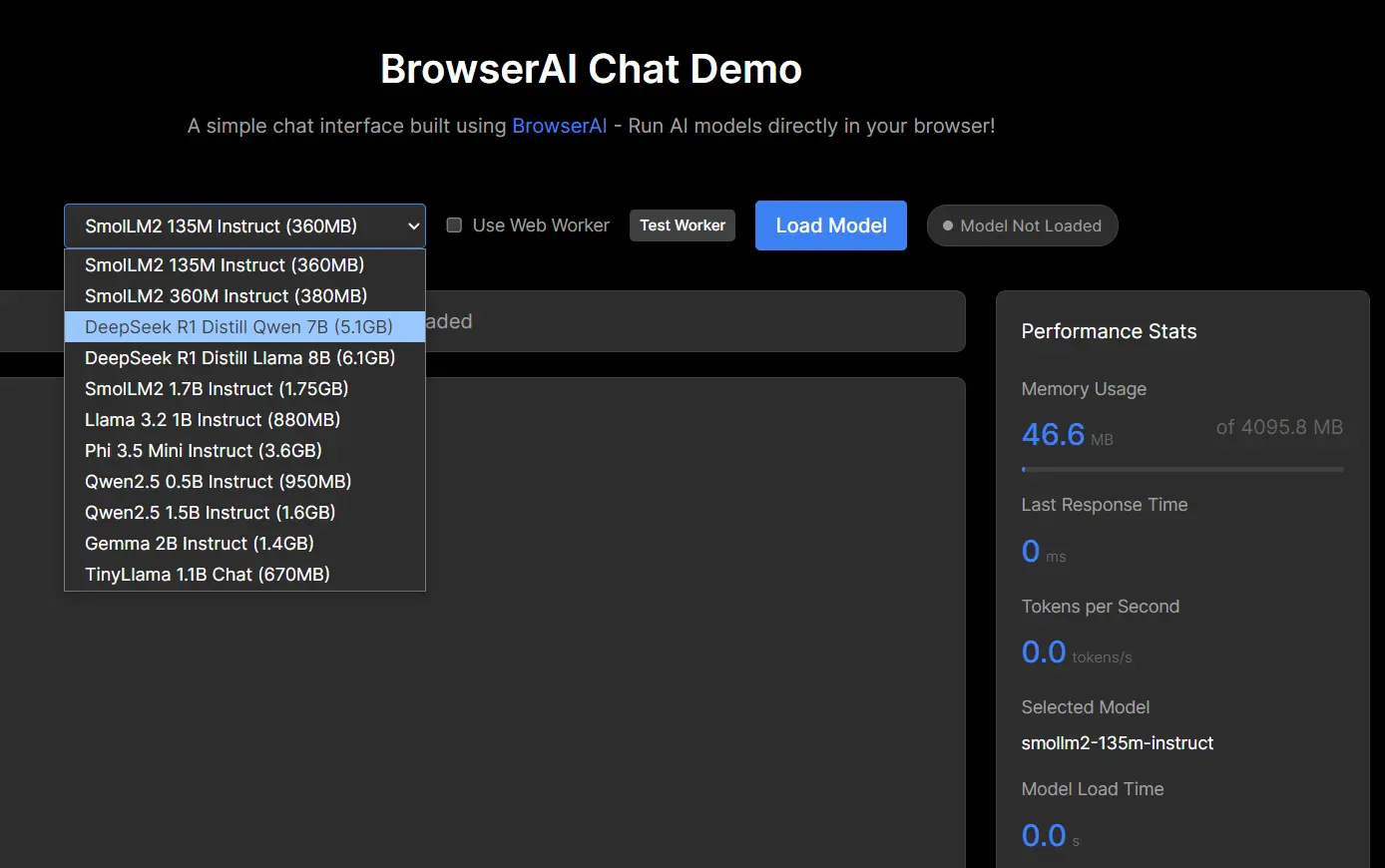
BrowserAI is a free, open-source platform that lets you run LLMs (like DeepSeek, Qwen, Llama, etc.) directly within your web browser. If you’ve been hesitant to explore LLMs due to privacy concerns or the hassle of setting up infrastructure, BrowserAI offers a solution.
This open-source project is particularly beneficial for web developers building AI-powered applications, companies that require privacy-conscious AI solutions and researchers who want to run local LLMs. You can experience near-native performance thanks to WebGPU acceleration, all while keeping your data completely local. It also works offline.
Features
- Complete Privacy: Because everything runs locally in your browser, your data never leaves your machine.
- WebGPU Acceleration: Get performance that rivals native applications.
- Eliminates Server Costs You won’t need to handle the expense or complexity of server infrastructure.
- Offline Functionality: After the initial model download, you can use BrowserAI without an internet connection.
- Multiple engine Support. It features a simple SDK that support multiple engine.
- Production-Ready: Offers a selection of pre-optimized, popular models, ensuring you can deploy applications with confidence.
- Model Versatility: Switch between MLC and Transformers engines.
- Pre-Configured Models: Access popular models that are ready to use immediately.
- Easy API: Use a straightforward API for tasks like text generation.
- Web Worker Support: Maintain a responsive user interface, even during intensive AI processing.
- Structured Output: Generate JSON schemas for structured data output.
- Audio Capabilities: Take advantage of speech recognition and text-to-speech.
- Built-In Database Support: Store conversations and embeddings with the integrated database.
LLMs Supported
- DeepSeek
- Gemma
- Kokoro-TTS
- Llama
- Phi
- Qwen
- SmolLM2
- Snowflake-Arctic-Embed
- TinyLlama
- Whisper
- and more…
Use Cases
- Private Customer Support Chatbot: Build a chatbot that handles customer inquiries directly in the user’s browser, ensuring no sensitive data is transmitted to a server.
- Offline Content Creation: A travel blogger can use BrowserAI to draft blog posts or generate social media captions while on a flight or in a remote location with limited internet access.
- Secure Document Summarization: Professionals in legal or financial fields can summarize confidential documents without the risk of data breaches, as all processing occurs locally.
- Real-Time Language Translation: Develop a browser-based translation tool that works instantly and privately, perfect for travelers or international teams.
- In-Browser Code Generation: Software developers can use BrowserAI to generate code snippets or complete functions directly within their browser-based IDE, speeding up development.
How To Use It
- Install the package in your project:
npm install @browserai/browserai yarn add @browserai/browserai- Import and initialize BrowserAI in your JavaScript/TypeScript code:
   import { BrowserAI } from '@browserai/browserai';
const browserAI = new BrowserAI();- Load a model with progress tracking:
   await browserAI.loadModel('llama-3.2-1b-instruct', {
     quantization: 'q4f16_1',
     onProgress: (progress) => console.log('Loading:', progress.progress + '%')
});- Generate text with your loaded model:
   const response = await browserAI.generateText('Hello, how are you?');
console.log(response);- For more advanced usage, customize parameters like temperature and maximum tokens:
   const response = await browserAI.generateText('Write a short poem about coding', {
     temperature: 0.8,
     max_tokens: 100,
     system_prompt: "You are a creative poet specialized in technology themes."
});- Implement chat functionality with system prompts:
   const response = await browserAI.generateText([
     { role: 'system', content: 'You are a helpful assistant.' },
     { role: 'user', content: 'What is WebGPU?' }
]);- For structured output, specify a JSON schema:
   const response = await browserAI.generateText('List 3 colors', {
     json_schema: {
       type: "object",
       properties: {
         colors: {
           type: "array",
           items: {
             type: "object",
             properties: {
               name: { type: "string" },
               hex: { type: "string" }
             }
           }
         }
       }
     },
     response_format: { type: "json_object" }
});- For speech recognition capabilities:
   await browserAI.loadModel('whisper-tiny-en');
   await browserAI.startRecording();
   const audioBlob = await browserAI.stopRecording();
   const transcription = await browserAI.transcribeAudio(audioBlob, {
     return_timestamps: true,
     language: 'en'
});- To implement text-to-speech:
   await browserAI.loadModel('kokoro-tts');
   const audioBuffer = await browserAI.textToSpeech('Hello, how are you today?', {
     voice: 'af_bella',
     speed: 1.0
   });
   const audioContext = new AudioContext();
   const source = audioContext.createBufferSource();
   audioContext.decodeAudioData(audioBuffer, (buffer) => {
     source.buffer = buffer;
     source.connect(audioContext.destination);
     source.start(0);
   });
Pros
- Privacy-Focused: All data processing happens within the user’s browser.
- High Performance: WebGPU acceleration provides near-native speed.
- Cost-Effective: No server infrastructure means no server costs.
- Offline Access: Use the tool even without an internet connection (after the initial setup).
- Developer-Friendly: A simple API makes integration easy.
Cons
- Browser Dependency: Requires a modern browser with WebGPU support (Chrome 113+, Edge 113+, or equivalent).
- Hardware Limitations: Devices must support 16-bit floating-point operations for some models.
- Initial Download: Loading a model initially will take a longer time.
Resources
- GitHub Repo: github.com/Cloud-Code-AI/BrowserAI
- Try It Now: chat.browserai.dev
- Documentation: docs.browserai.dev
- Discord Community: discord.gg/6qfmtSUMdb
FAQs
Q: What is WebGPU, and why is it important for BrowserAI?
A: WebGPU is a modern web standard that allows web applications to access your computer’s graphics processing unit (GPU). BrowserAI takes advantage of the performance it can achieve using WebGPU.
Q: What hardware acceleration works best?
A: Discrete GPUs with 6GB+ VRAM. Integrated Intel/AMD GPUs show 40% slower performance.
Q: Can I use BrowserAI if I have a slow internet connection?
A: You can. Once you’ve downloaded the initial model, BrowserAI works completely offline.
Q: Is my data really secure if everything runs in the browser?
A: Yes. Because all processing happens locally, your data never leaves your computer.
Q: Which large language models are currently supported?
A: BrowserAI supports a range of models, including Llama-3.2-1b-Instruct, SmolLM2 series, Qwen series, Gemma-2B-IT, and more. Additional models, like Whisper for speech recognition and Kokoro for text-to-speech, are also available.
Q: How can I request support for a new model?
A: You can request a new model by creating an issue on the BrowserAI GitHub repository.
Q: What browser requirements does BrowserAI have?
A: BrowserAI requires a modern browser with WebGPU support, which includes Chrome 113+, Edge 113+, or equivalent. Some models with the “shader-f16” requirement need hardware that supports 16-bit floating point operations.
Q: Does BrowserAI work offline after initial setup?
A: Yes, once the models are downloaded, BrowserAI functions completely offline without requiring an internet connection for inference tasks.
Q: How does local processing impact the performance of language models?
A: BrowserAI uses WebGPU acceleration to deliver near-native performance. While not as powerful as dedicated GPU servers, it provides sufficient performance for many applications while eliminating network latency.
Q: Can I implement RAG (Retrieval-Augmented Generation) with BrowserAI?
A: Yes, BrowserAI has plans for RAG implementations in its roadmap, with simple RAG capabilities in Phase 1 and enhanced capabilities including hybrid search, auto-chunking, and source tracking in Phase 2.
Give BrowserAI a try today and start building AI-powered applications directly in your browser. Let us know your thoughts in the comments below, and don’t forget to share your experiences with us on social media!