AI Video Prompt Generator is a free AI tool that transforms your video ideas into clear, detailed, structured prompts. It provides precise instructions on camera work, lighting, and composition to help you create professional AI-generated video content without lengthy preparation.
This tool is great for content creators, marketers, and indie filmmakers who lack technical expertise to gain access to professional-grade video outputs, while experienced users save hours on prompt engineering. It operates free of charge, requiring no account creation or usage limits.
I tested the prompt generator with three different basic video concepts to evaluate its enhancement capabilities.
For my first test, I entered a simple prompt: “Cinematic drone shot of a car driving through a mountain road at sunset, golden hour lighting.” The generator provided three enhanced options, each offering significantly more detail. One standout option described “a sleek sports car navigating a winding mountain road during golden hour” with specific instructions about capturing dynamic movement and emphasizing the interplay between light, shadow, and motion.
Majestic drone shot following a sleek sports car as it navigates a winding mountain road during the golden hour. The warm, golden sunlight bathes the landscape, creating long shadows and highlights on the car's surface. Capture the dynamic movement with smooth, cinematic camera work, emphasizing the car's speed and the breathtaking scenery.

Aerial view of a classic convertible cruising along a serpentine mountain pass at sunset. The sky is ablaze with vibrant oranges and reds, reflected in the car's polished chrome. The drone maintains a steady distance, showcasing the car's journey through the rugged terrain, with a focus on the interplay between light, shadow, and motion.

Sweeping drone footage of an off-road vehicle traversing a steep mountain trail as the sun dips below the horizon. The dramatic lighting casts a warm glow on the vehicle, silhouetting the mountain peaks in the background. Capture the sense of adventure and freedom, with the drone dynamically adjusting its altitude to emphasize both the car's progress and the stunning panoramic views.
My second test involved an animated product showcase prompt: “Animated 3D product showcase of a sleek smartphone rotating on a pedestal with dynamic lighting.” The enhanced versions included specific details about pedestal materials, lighting transitions, and background effects. One option specified a “polished chrome pedestal” with lighting that “shifts gradually from cool blue to warm orange,” creating a much more precise visual instruction.
3D animated product showcase of a sleek, futuristic smartphone. The phone slowly rotates on a polished chrome pedestal. Dynamic lighting shifts gradually from cool blue to warm orange, highlighting the phone's curved edges and seamless design. Subtle lens flares emphasize the phone's screen brightness. Clean, minimalist background. High-quality render, smooth animation.

Animated 3D presentation of a modern glass-backed smartphone. The phone elegantly spins atop a white marble pedestal. The lighting dynamically changes, starting with a soft, diffused glow and intensifying to reveal the intricate details of the phone's camera array. Background transitions from a soft gradient to a bokeh effect. Focus on showcasing the phone's premium build and cutting-edge technology. Fluid, professional animation.

A captivating 3D animation featuring a cutting-edge smartphone. The device rotates smoothly on a matte black pedestal. Lighting begins with a focused spotlight, then expands to reveal the phone's full form, emphasizing its slim profile and vibrant display. Background includes subtle geometric patterns that shift and animate. The scene highlights the phone’s innovative features and sophisticated design with smooth, eye-catching movements. High-resolution render.
For my final test, I used a documentary-style interview prompt: “Documentary-style interview with shallow depth of field, subject sitting in a cozy living room.” The enhanced versions added substantial detail about lighting conditions, camera movements, and background elements. One option included instructions for “subtle shifts in focus” to “emphasize key details in the background, hinting at the subject’s life and experiences.”
A captivating documentary-style interview unfolds in a warm, inviting living room. The subject, bathed in soft, natural light, sits comfortably, their features gently blurred by a shallow depth of field. The camera focuses intently on their face, capturing every subtle expression and nuance as they share their story. Gentle camera movements enhance the intimacy, creating a genuine connection with the viewer. The background, filled with books and personal mementos, adds depth and context to the narrative.

An intimate documentary-style interview set in a cozy, lived-in living room. A shallow depth of field isolates the subject, drawing the viewer's eye to their face and emotions. Subtle shifts in focus emphasize key details in the background, hinting at the subject's life and experiences. The lighting is soft and diffused, creating a relaxed atmosphere. As the subject speaks, the camera subtly zooms in and out, intensifying the emotional impact of their words, creating a profound sense of closeness.

In a heartfelt documentary-style interview, a subject is seated in a snug, warmly lit living room, their image softened by a shallow depth of field. The camera remains steady, allowing the viewer to fully absorb the subject's words and expressions. The background, deliberately blurred, provides a sense of place without distracting from the main focus. Natural light streams in, casting gentle shadows that add depth and dimension to the scene. The overall effect is one of authenticity and emotional resonance.
In each case, the generator transformed basic concepts into technically precise instructions that would help AI video platforms create more professional content.
Use Cases
- Marketing Campaigns: You’re launching a new product. You can use this tool to plan out a series of video ads, each one highlighting different product features with specific, eye-catching shots.
- Social Media Content: Want to create short, engaging videos for TikTok or Instagram? This tool helps you pick out the perfect visual styles and quick transitions that grab viewers’ attention.
- Educational Tutorials: If you need to make explainer videos with clear, step-by-step visuals, this is your go-to. Use the tool to direct the AI, so you get focused, instructional content that’s easy to follow.
- Brand Storytelling: Think about crafting a video that really tells your brand’s story. The prompt generator helps you set the scenes, create the right mood, and choose visual elements that connect with your audience on an emotional level.
- Animation Projects: If you’re working on an animated short film, this tool can be a huge help. You will get the detailed prompts to set up precise character movements, background details, and cool visual effects.
How To Use It
1. Visit the AI Video Prompt Generator website and describe your video idea in any language (up to 800 characters).
2. Click the “Generate Prompts” button. The AI will analyze your input and generate three structured, enhanced prompts similar to the examples in the case study.
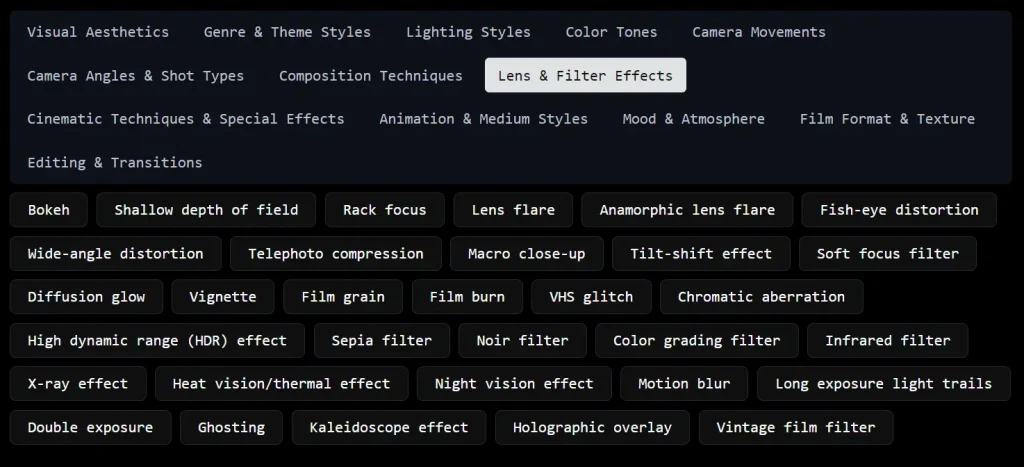
3. Alternatively, select from the curated prompt template library and personalize key elements with your specific vision. This option helps maintain professional structure while adding your unique creative direction.
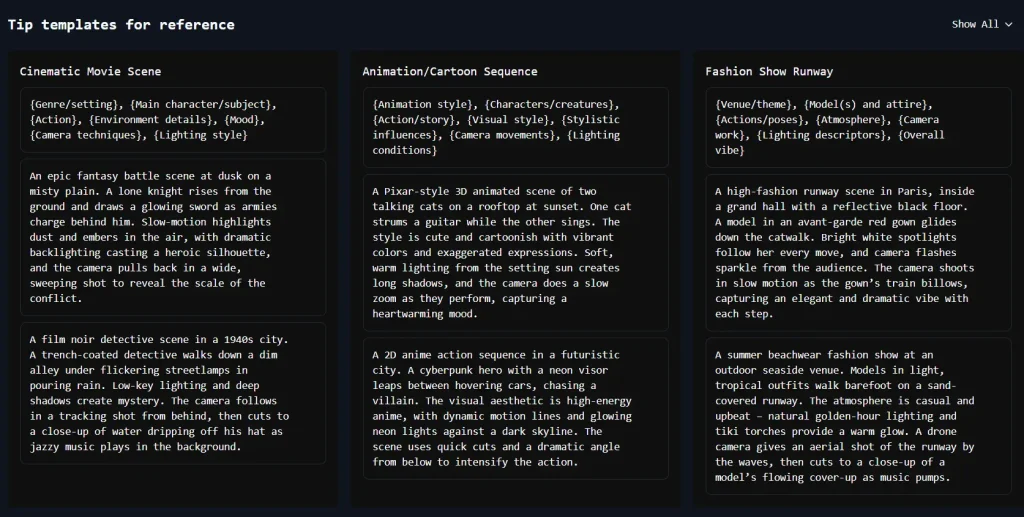
4. You can also combine template structures with custom elements. Input a template framework followed by your specific requirements to create a prompt that balances technical precision with creative vision.
Pros
- Enhanced Detail: Turns basic concepts into detailed, technically precise prompts.
- Time-Saving: Reduces the time spent crafting effective prompts.
- User-Friendly: Designed for users of all experience levels.
- Free and Unlimited: Accessible without cost or restrictions.
Cons
- Character Limit: The 800-character input limit may restrict complex video concepts that require extensive description.
- No Visual Preview: Users cannot see a preview of how their prompt might translate into actual video content.
FAQs
Q: How does this tool enhance the video creation process?
A: It suggests optimal camera movements, scene transitions, and composition techniques based on your intended content, resulting in more consistent, professional-looking videos while reducing the time spent crafting effective prompts.
Q: Can someone without video production knowledge use this tool effectively?
A: Yes, the tool is designed to be accessible to users of all experience levels. It provides guided templates with explanations of video terminology and visual techniques. The step-by-step interface helps beginners understand and implement professional video concepts without requiring prior technical knowledge.
Q: Why do I keep getting inconsistent results from the AI Video Generator?
A: AI video generation can be unpredictable because of vague or incomplete prompts. The AI Video Prompt Generator structures your ideas, offering clearer direction.